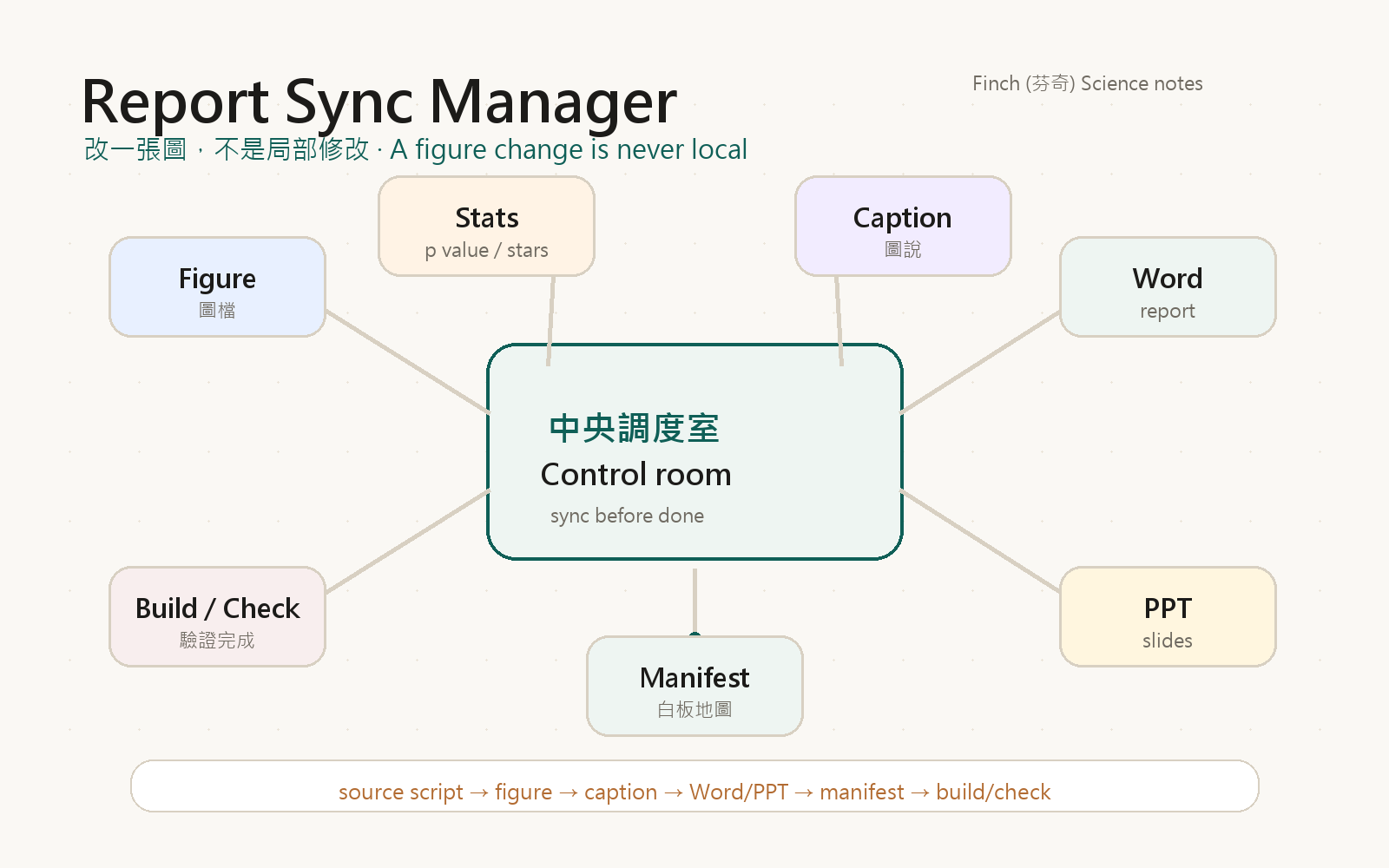
Report Sync Manager:改一張圖,不是局部修改
我以前常以為,改一張圖就是改一張圖。
Figure 1 的顏色不夠清楚,就把圖重新輸出。
p value 的星號標錯了,就把星號改掉。
caption 有一句話不精準,就把 caption 修一下。
看起來都像小事。
但科學報告裡的小事,很少真的只是小事。
因為一張 figure 從來不是孤立存在的。
它背後有 source script,有統計結果,有輸出檔,有 caption,有 Word report,有 PowerPoint slide,有 manifest,也有最後的 build 和 check。
所以真正的問題不是:
這張圖有沒有改好?
真正的問題是:
這張圖改了以後,整份報告有沒有一起同步?
改一張圖,不是局部事件
一份科學報告很像一間忙碌的實驗室。
Figure 在顯微鏡旁邊。
Statistics 在電腦裡跑。
Caption 在 Word 報告裡等著被確認。
PowerPoint slide 在另一個資料夾裡準備拿去開會。
Manifest 則像牆上的白板,記著每張圖從哪裡來、被放到哪裡、誰引用了它。
如果今天只是把 figure 圖檔換掉,卻沒有通知其他部門,事情很快就會亂。
Word 裡可能還是舊圖。
PPT 裡可能仍然是上一版。
caption 可能描述的是舊分組。
p value 可能來自舊統計。
星號可能看起來很漂亮,但其實不再對應現在的資料。
這就是 report drift。
不是某個人故意弄錯,而是報告裡的元件沒有一起移動。
Report Sync Manager 像一間中央調度室
所以我需要的不是讓 AI 更努力。
我需要的是一間中央調度室。
Report Sync Manager 的角色,就是在任何 figure、統計、caption、Word 或 PPT 被修改時,提醒整個報告系統:
這不是局部修改。請檢查所有下游輸出。
它像機場控制塔。
飛機不是只有自己起飛就好。跑道、塔台、天氣、航線、地勤、乘客資訊都要同步。
科學報告也是一樣。
一張圖改了,圖說要跟著看。
統計改了,p value 和星號要跟著看。
Word 改了,PPT 要跟著看。
PPT 改了,最終 build 和 check 也要跟著看。
中央調度室不一定親自開每一架飛機。
但它要知道每一架飛機在哪裡、下一步去哪裡、哪些訊號還沒確認。
報告裡有很多部門
Report Sync Manager 之所以重要,是因為科學報告不是一份單純的文章。
它其實是很多部門一起合作:
- analysis script:真正產生圖和統計的地方。
- figures folder:輸出的圖檔。
- stats output:p value、effect size、分組結果。
- caption:把圖說清楚的文字。
- Word report:正式報告或 manuscript。
- PowerPoint:簡報版本。
- manifest:記錄 figure 和下游引用位置的地圖。
- build/check:最後確認整份報告是否一致。
如果只靠搜尋和記憶,AI 很容易漏掉其中一個部門。
尤其當專案越來越大、圖越來越多、Word 和 PPT 各有一份時,漏同步幾乎是遲早的事。
所以這套方法的重點不是增加複雜度。
它是在複雜度已經存在時,給它一個可以被檢查的秩序。
Manifest 是調度室的白板
在這個系統裡,manifest 是最重要的白板。
它記錄一張 figure 的完整生命線:
- 這張圖的 ID 是什麼。
- source script 在哪裡。
- 輸出圖檔在哪裡。
- caption 寫在哪裡。
- Word report 哪一段引用它。
- PPT 哪一頁使用它。
- 統計結果從哪裡來。
- 最後要跑哪些 build 和 check。
沒有 manifest,AI 只能靠搜尋。
靠搜尋不是不行,但搜尋很像在實驗室裡問:「有人看過 Figure 2 嗎?」
有人可能回答。
也可能沒有人回答。
更糟的是,有人回答了舊版本。
Manifest 的價值,是讓每張圖都有自己的身份證和路線圖。
當 figure 改了,調度室可以順著路線圖往下檢查,而不是在整個專案裡猜。
什麼時候要啟動 Report Sync Manager
有些任務不需要啟動整套同步流程。
例如只是解釋一段 PowerShell 錯誤,或者修一個不影響報告內容的 typo。
但只要碰到下面這些東西,就應該啟動:
- 修改 figure、plot、panel。
- 修改 p value、星號、統計方法。
- 修改 caption、legend、figure title。
- 修改 Word report、manuscript。
- 修改 PowerPoint slide。
- 檢查 Word 和 PPT 是否一致。
最穩的判斷句是:
這次修改會不會影響讀者看到的科學結論?
如果會,就不要把它當成小修。
它是報告同步任務。
完成不是一句「改好了」
AI 最容易犯的一個錯,是改了一個檔案以後就說完成。
但在科學報告裡,完成不能只靠一句話。
完成要有證據。
最少要能回答:
- affected figure 是不是從 source 重新產生?
- caption 和現在的圖是否一致?
- Word report 是否引用最新圖與最新統計?
- PPT 是否也換成最新版本?
- manifest 是否更新?
- build 是否成功?
- check 是否通過?
如果 check 失敗,就不能假裝完成。
如果某一步做不到,就要明確說明 blocker。
這不是形式主義。
這是讓科學報告可以被信任的基本衛生。
人類仍然是總指揮
Report Sync Manager 不是要把人類移出流程。
剛好相反。
它是讓人類可以更清楚地指揮。
人類決定科學問題是什麼。
人類判斷哪些比較重要。
人類確認最後的圖和文字是否符合研究邏輯。
AI 可以幫忙找檔案、改 script、重建輸出、檢查 Word 和 PPT。
但 AI 不應該在沒有同步檢查的情況下,自己宣布整份報告完成。
中央調度室存在的目的,是讓人類不用靠記憶追每一條線。
而是可以看著同一張白板,知道現在改到哪裡,還缺哪裡。
這個流程真正保護的是信任
科學報告最怕的不是慢。
最怕的是看起來完成,其實不同步。
圖是新版。
caption 是舊版。
PPT 是更舊版。
p value 又是另一版。
這種錯誤很難一眼看出來,但一旦被發現,整份報告的可信度就會被傷到。
Report Sync Manager 想保護的,就是這件事。
它把「改一張圖」重新定義成「檢查整份報告是否一起移動」。
它讓 AI 不只是會修改,而是知道修改後要負責同步。
它讓報告不是靠運氣維持一致,而是靠一套可追蹤、可驗證、可重建的流程維持一致。
這就是我想要的科學報告工作方式。
不是更快地改完。
而是更可靠地完成。
Report Sync Manager: A Figure Change Is Never Local
I used to think that changing a figure meant changing a figure.
If Figure 1 was hard to read, I exported a cleaner version.
If a p value had the wrong star, I corrected the star.
If a caption was imprecise, I edited the caption.
Each change looked small.
But in a scientific report, small changes are rarely small by themselves.
A figure is never isolated.
Behind it, there is a source script, a statistical result, an output file, a caption, a Word report, a PowerPoint slide, a manifest, and the final build and check.
So the real question is not:
Did I update the figure?
The real question is:
After the figure changed, did the whole report move with it?
A Figure Change Is Not A Local Event
A scientific report is like a busy laboratory.
The figure sits near the microscope.
The statistics run on another computer.
The caption waits inside the Word report.
The PowerPoint slide lives in a different folder, ready for a meeting.
The manifest is the whiteboard on the wall, recording where each figure comes from and where it is used.
If I replace only the image file and do not notify the rest of the system, things drift quickly.
The Word document may still contain the old figure.
The slide deck may still show the previous version.
The caption may describe an old grouping.
The p value may come from an old statistical run.
The stars may look neat, but no longer match the data.
That is report drift.
It is not always caused by carelessness.
It often happens because the parts of the report did not move together.
Report Sync Manager Is A Control Room
What I need is not an AI that simply tries harder.
I need a control room.
Report Sync Manager exists to notice when a figure, statistic, caption, Word report, or slide has changed, and then remind the whole report system:
This is not a local edit. Check every downstream output.
It is like an airport control tower.
A plane does not just take off by itself. The runway, tower, weather, route, ground crew, and passenger information all need to agree.
A scientific report works the same way.
When a figure changes, the caption must be checked.
When the statistics change, the p value and stars must be checked.
When the Word report changes, the slides must be checked.
When the slides change, the final build and check must still pass.
The control room does not fly every plane.
But it knows where each plane is, where it should go next, and which signals are still missing.
A Report Has Many Departments
Report Sync Manager matters because a scientific report is not a single document.
It is a collaboration among many departments:
- analysis script: where figures and statistics are produced.
- figures folder: where image outputs are stored.
- stats output: where p values, effect sizes, and group comparisons live.
- caption: the text that explains the figure.
- Word report: the manuscript or formal report.
- PowerPoint: the presentation version.
- manifest: the map of figure IDs and downstream references.
- build/check: the final consistency gate.
If an AI relies only on search and memory, it can easily miss one of these departments.
The larger the project becomes, the more likely that a missing sync will happen.
This system does not add complexity for its own sake.
It gives existing complexity a structure that can be checked.
The Manifest Is The Whiteboard
In this system, the manifest is the most important whiteboard.
It records the full life of a figure:
- the figure ID.
- the source script.
- the output image.
- the caption location.
- the Word report section.
- the PowerPoint slide.
- the statistical source.
- the build and check commands.
Without a manifest, the AI has to search.
Search can help, but it is like walking around the laboratory asking, “Has anyone seen Figure 2?”
Someone may answer.
Someone may not.
Worse, someone may answer with the old version.
The manifest gives each figure an identity card and a route map.
When a figure changes, the control room can follow the map instead of guessing across the whole project.
When Report Sync Manager Should Wake Up
Not every task needs the full synchronization process.
Explaining a PowerShell error does not need it.
Fixing a typo unrelated to any figure or result usually does not need it.
But the system should wake up when the task touches:
- a figure, plot, or panel.
- a p value, star, or statistical method.
- a caption, legend, or figure title.
- a Word report or manuscript.
- a PowerPoint slide.
- a consistency check between report and slides.
The safest test is:
Could this change affect the scientific conclusion a reader sees?
If yes, it is not a small local edit.
It is a report synchronization task.
“Done” Is Not A Sentence
One easy mistake for an AI agent is to edit one file and then say it is done.
In a scientific report, completion cannot be just a sentence.
Completion needs evidence.
At minimum, the system should answer:
- Was the affected figure regenerated from source?
- Does the caption match the current figure?
- Does the Word report use the current figure and statistics?
- Does the slide deck also use the current version?
- Was the manifest updated?
- Did the build succeed?
- Did the check pass?
If the check fails, the task is not done.
If a step cannot be completed, the blocker should be stated clearly.
This is not bureaucracy.
It is basic hygiene for a scientific report that needs to be trusted.
The Human Is Still The Commander
Report Sync Manager does not remove the human from the process.
It does the opposite.
It gives the human a clearer way to command the work.
The human decides the scientific question.
The human judges what matters most.
The human checks whether the final figure and text still make scientific sense.
AI can help find files, edit scripts, rebuild outputs, and compare Word and slides.
But AI should not declare the whole report complete without synchronization checks.
The purpose of the control room is to reduce the need for human memory.
Everyone can look at the same whiteboard and see what changed, what was rebuilt, and what still needs attention.
What This Process Really Protects
The worst problem in a scientific report is not being slow.
The worst problem is looking finished while being inconsistent.
The figure is new.
The caption is old.
The slide is older.
The p value belongs to another run.
This kind of error is hard to see at first, but once it is found, it damages trust in the whole report.
That is what Report Sync Manager is meant to protect.
It redefines “change one figure” as “check whether the whole report moved together.”
It teaches AI that editing is not enough; synchronization is part of the job.
It keeps the report consistent through a process that is traceable, verifiable, and reproducible.
That is the kind of scientific report process I want.
Not just faster edits.
More reliable completion.